핸들러란?
윈도우에서 핸들러(Handler)는 객체나 리소스를 참조하고 관리하기 위해 사용되는 고유한 식별자 이다. 여기서 객체나 리소스란
파일 ,프로세스 창, 쓰레드, 메모리 , 윈도우 창 등등
// 파일 핸들
HANDLE hFile = CreateFile(...);
// 프로세스 핸들
HANDLE hProcess = OpenProcess(...);
// 윈도우 GUI 창 핸들  HWND는 handle to window 의 약자
HWND hWnd = CreateWindow(...); // 참고로 윈도우 창은 유저 오브젝트임
hFile , hProcess ,hWnd 다음과 같이 식별자로 관리하기 위한 개념이다.
그렇다면 얘내들의 역할은 뭘까?
 TISTORYWindows OS - Kernel Object(커널 오브젝트)
Windows OS - Kernel Object(커널 오브젝트)
커널 오브젝트는 무엇인가? Windows는 Object의 형태로 OS내의 자원을 관리한다. Object는 메모리 블럭의 형태를 띄고있다. C/C++ 의 구조체를 생각하면 된다. https://docs.microsoft.com/en-us/windows/win32/sysinfo/object-categories Object Categories - Win32 apps The system provides three categories of objects: user, graphics device interface (GDI), and kernel. docs.microsoft.com 이중에서, 그 중요도가 높아 Windows Kernel에 의해서 관리되는 자원을 Kernel Object로 분리해두었다. Windows ..
TISTORY해당 사이트를 참고했다.
오브젝트들의 카테고리 ( 유저 오브젝트 , 커널 오브젝트 등 )

Object Categories - Win32 apps
The system provides three categories of objects: user, graphics device interface (GDI), and kernel.
커널에는 오브젝트라는 개념이 있다.
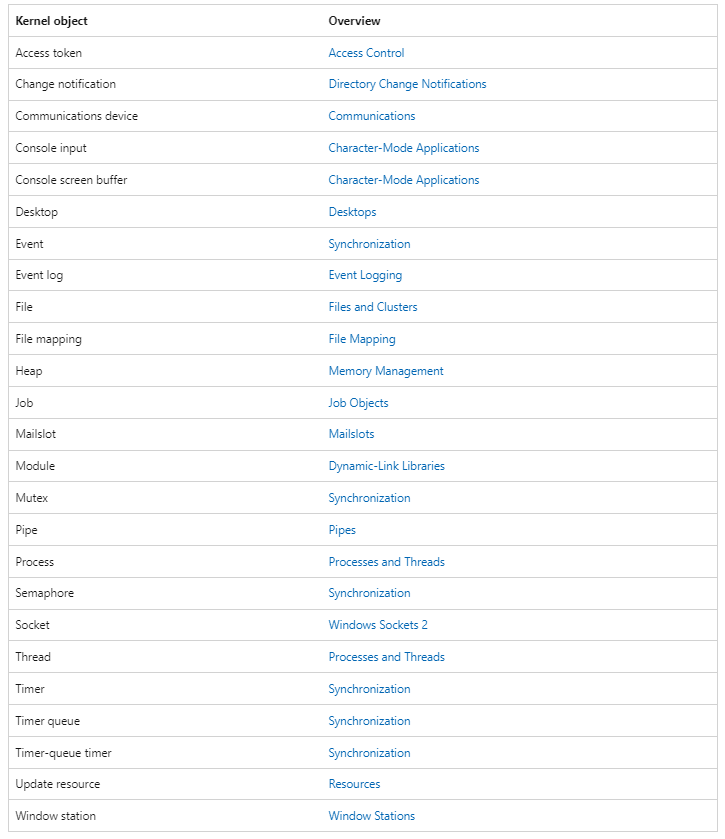
공식 사이트에 따르면, 이런식으로 존재하는데 프로세스가 메모리 관리나 스레드 생성을 하려면 커널 오브젝트 를 사용해야 한다.
그런데 프로세스가 커널에 존재하는 오브젝트 ( 스레드 , 파이프 ) 을 함부러 사용할 수 있을까?
당연히 아니다. → 그럼 어떻게 프로세스 한테 안전하게 이런 오브젝트를 다룰 수 있게 할수 있을까?
에서 나온 개념이 핸들이다.
핸들의 역할
핸들(러)는 운영 체제에서 프로세스를 관리할 때 사용하는 고유한 값으로, 해당 프로세스에 대해 특정 작업을 수행할 수 있는 권한을 제공한다. 예를 들어, 프로세스 메모리 읽기/쓰기, 쓰레드 정보 조회, 프로세스 종료 등의 작업을 수행할 때 이 핸들이 필요하단 말임. 즉, 카드키의 역할을 한다.
hFile , hProcess , hWnd 여기에는 정수값이 들어가며, 이것은 특정 객체를 참조하는 테이블 인덱스 값 이다. 이 값 자체는 각각의 프로세스 내에서 관리되는 핸들 테이블의 인덱스와 같은 역할을 하게된다. 운영 체제는 이 값을 통해 해당 객체에 접근 할 수 있게 된다.
그럼 프로세스 핸들러 테이블은 어디에 있을까?
프로세스 핸들러 → 해당 프로세스를 핸들을 연 프로세스의
ObjectTable 에서 관리ObjectTable 해당 프로세스가 연 커널 객체들(파일, 메모리, 쓰레드 등)의 핸들을 관리하는 Table.
( 프로세스가 연 커널 오브젝트가 아닌 유저 오브젝트 들은 User Mode Object Management System에서 관리 한다고 한다. )
ObjectTable 은 프로세스의 구조체인 EPROCESS 에 포함되어 있음EPROCESS 구조체는 커널에서 프로세스 객체로 사용되며, 커널 모드에서 프로세스 관리, 리소스 제어, 권한 제어, 메모리 맵핑 등 다양한 작업에 활용됨. 사용자 모드 프로그램이 프로세스에 대해 수행하는 작업(예: 새로운 프로세스 생성, 프로세스 종료, 메모리 접근 등)은 커널 모드에서 이 EPROCESS 구조체에 의해 관리됨EPROCESS의 주요 역할:
- 프로세스 식별 및 관리: 각 프로세스는 고유한
EPROCESS구조체를 가지고 있으며, 커널에서 해당 프로세스를 참조할 때 이 구조체를 사용합니다.
- 메모리 관리: 프로세스가 사용하는 가상 메모리 영역을 관리합니다.
- 핸들 테이블 관리: 프로세스가 열어 놓은 핸들 목록을 관리합니다.
- 스레드 정보 관리: 프로세스에 속한 각 스레드에 대한 정보가 포함되어 있습니다.
- 보안 및 권한 관리: 프로세스의 보안 토큰과 접근 권한에 대한 정보가 포함됩니다.
그렇다면 커널도 사용하는 핸들들이 있을까?
 Windows Handle Table & Object | Shh0ya Security Lab
Windows Handle Table & Object | Shh0ya Security Lab
Windows Handle Table & Object
해당 사이트를 참고했다.
좀 심화적인 내용을 다룬다. 아마, 핵심은 System 프로세스의
ObjectTable 이 커널에서 사용하는 핸들들의 테이블이라는 것 같다.즉, 확실한건 커널 모드에서도 자체적으로 핸들을 만들어서 사용함.
프로세스 핸들러 테이블 확인
타겟 프로세스의 핸들과 pid를 출력해주는 유저레벨 코드 구현
#include <windows.h>
#include <tlhelp32.h>
#include <iostream>

DWORD GetProcessIdByName(const wchar_t* processName) {
    DWORD processId = 0;
    HANDLE snapshot = CreateToolhelp32Snapshot(TH32CS_SNAPPROCESS, 0); // 프로세스 스냅샷 생성

    if (snapshot != INVALID_HANDLE_VALUE) {
        PROCESSENTRY32 processEntry;
        processEntry.dwSize = sizeof(PROCESSENTRY32);

        if (Process32First(snapshot, &processEntry)) {
            do {
                if (_wcsicmp(processEntry.szExeFile, processName) == 0) {
                    processId = processEntry.th32ProcessID; // 프로세스 ID 가져오기
                    break;
                }
            } while (Process32Next(snapshot, &processEntry));
        }
        CloseHandle(snapshot);
    }
    return processId;
}

int main() {
    const wchar_t* processName = L"notepad.exe"; // Notepad 프로세스 이름
    DWORD processId = GetProcessIdByName(processName); // PID 가져오기

    if (processId == 0) {
        std::cout << "Notepad 프로세스를 찾을 수 없습니다." << std::endl;
        return 1;
    }

    // 1. OpenProcess로 프로세스 핸들 열기
    HANDLE hProcess = OpenProcess(PROCESS_ALL_ACCESS, FALSE, processId);
    if (hProcess == NULL) {
        std::cout << "프로세스 핸들을 열 수 없습니다." << std::endl;
        return 1;
    }

    std::cout << "Notepad 프로세스 핸들 열림! PID: " << processId << std::endl;
    std::cout << "Notepad 프로세스 핸들 값 : " << hProcess << std::endl;

    while (1);
    CloseHandle(hProcess);
    return 0;
}
일단 핸들값과 PID 값을 출력하고 핸들을 닫으면 해당 객체가 없어지니깐 일단 while 문으로 무한루프를 돌게 해놓았다.
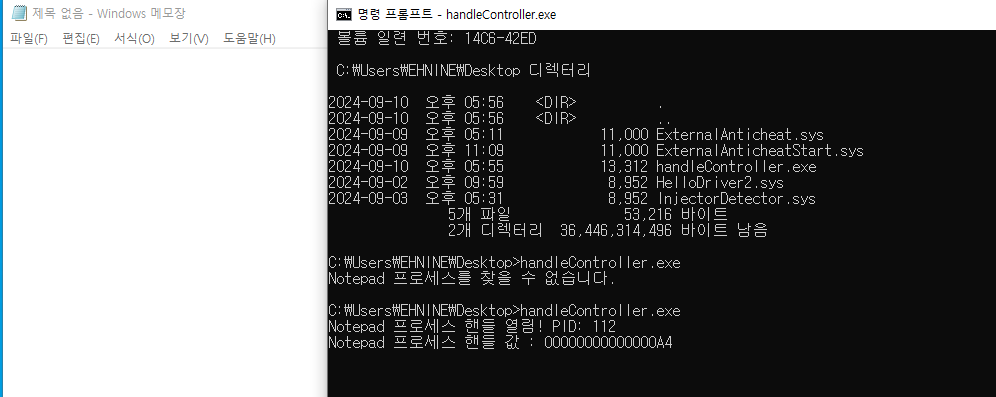
일단 성공을 하였고 PID가 112 인것과 프로세스 핸들의 값이 A4 (
ObjectTable인덱스) 인 것을 확인 할 수 있었다.
자 이제, Windbg 로 확인을 해보자
ffffc88e861d7080
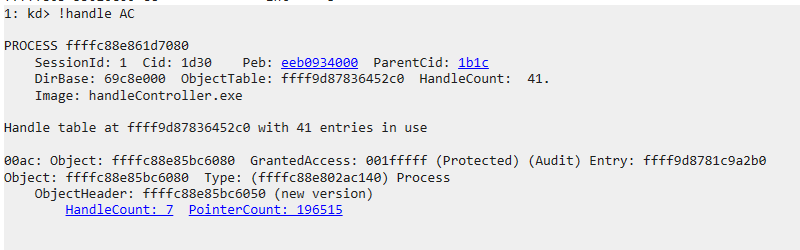
명령어
!handle AC
이 명령어는 모든 프로세스의 인덱스 테이블에 AC 위치에 존재하는 핸들 정보를 표시해준다. (혹은 최신 프로세스 ) → 프로세스를 지정해 줄 수 있으니 다음부턴 지정하자
이제 결과를 해석해보겠다.
PROCESS ffffc88e861d7080
    SessionId: 1  Cid: 1d30    Peb: eeb0934000  ParentCid: 1b1c
    DirBase: 69c8e000  ObjectTable: ffff9d87836452c0  HandleCount:  41.
    Image: handleController.exe

Handle table at ffff9d87836452c0 with 41 entries in use

00ac: Object: ffffc88e85bc6080  GrantedAccess: 001fffff (Protected) (Audit) Entry: ffff9d8781c9a2b0
Object: ffffc88e85bc6080  Type: (ffffc88e802ac140) Process
    ObjectHeader: ffffc88e85bc6050 (new version)
        HandleCount: 7  PointerCount: 196515
Handle table at ffff9d87836452c0 with 41 entries in use
일단 해당 핸들이
ffffc88e861d7080 프로세스가 연 핸들러 중에 포함되어 있다는 말을 하고 있다. ffffc88e861d7080 프로세스는 handleController.exe 이름을 가지고 있다. handleController.exe 바로 내가 위에서 실행한 pid 와 핸들값을 출력해주는 프로그램 이름이다.즉, 이 프로세스에서 핸들을 열었으므로 당연한 얘기다.
이제 아래
00ac 에서 확인 할 수 있는건 Object: ffffc88e85bc6080 인데 이 주소는 바로 notepad.exe 의 프로세스 구조체인 EPROCESS 의 주소이다. Type: (ffffc88e802ac140) Process 역시 해당 핸들러가 프로세스를 참고하고 있다는 정보도 있으며HandleCount: 7 은 해당 객체가 7개의 핸들이 있다라는 의미며 ( 웰케 많아? 단순 메모장인데 )PointerCount: 196515 은 커널에서 참조되는 수라고 한다. GrantedAccess: 001FFFFF 는 이 객체에 대해 지금 프로세스 (ffffc88e861d7080) 가 가지고 있는 권한이다. 해당 권한은 나중에 더 자세하게 다룬다. 여기서 부터 이어서
핸들러를 이용한 Externalhack Anticheat [ Optimize ]
일단 저번에 작성 Externalhack Anticheat 1호기에 대해 개인적으로 분석하면서 너무 많은 리소스를 자치한다는 느낌이 들었다. 즉, 게임이 실행되고 있지 않는 순간에도 안티치트가 너무 열일을 하고 있다는 것이다. 특히, 핸들러를 가지고 올때 콜백함수와 프로세스, 스레드 생성 및 삭제 콜백함수를 사용한다면 이는 극대화 된다. 핸드러를 다루는 것과 프로세스를 생성 및 삭제는 게임이 실행되지 않을때가 오히려 더 많이 사용된다. 이는 필요 하지 않은 오버헤드로 이어질 수 있다.
따라서, 이를 좀 삭제 해보고 최적화를 진행해 보려고 한다.
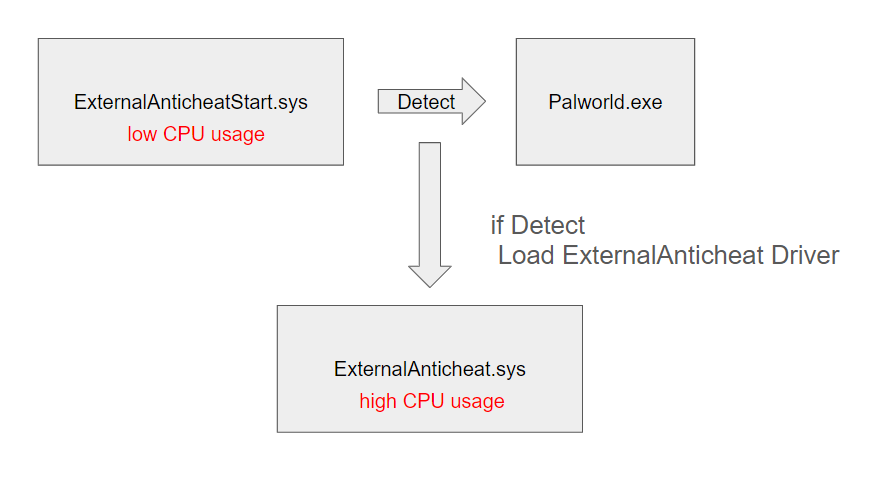
ExternalAnticheatStart.sys
다음과 같은 드라이버를 구현하려면 타셋 프로세스가 실행중인지에 따라 드라이브를 커널 상에서 로드 하거나 언로드 할 수 있는 코드를 구현해야 한다.
비문서화 명령어
이번에는 한번 비문서화 명령어를 시도해 보았다.
위 사이트를 참고해서
NtLoadDriver 함수를 사용해보려고 했는데 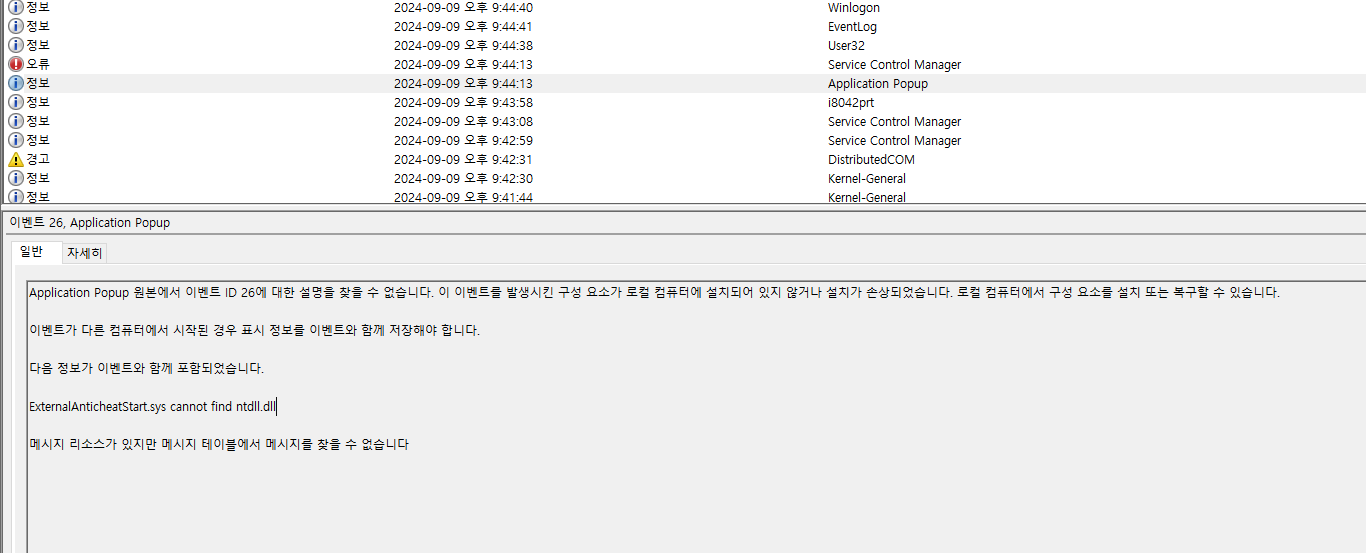
이벤트 뷰어로 보았을때 다음과 같은 오류가 발생하면서 실행이 되지 않는다. ntdll.dll이 없지도 않고 문제를 찾지 못했다. 따라서 정규화 문서에 있는
ZwLoadDriver 명령어로 시도하게 되었다. 코드 부분
#include <ntddk.h>

UNICODE_STRING FocusMode_driver = RTL_CONSTANT_STRING(L"\\Registry\\Machine\\SYSTEM\\CurrentControlSet\\Services\\ExternalDriver");


HANDLE targetPID = NULL;


// 모드가 1일 때 다른 드라이버 로드
NTSTATUS LoadDriver(UNICODE_STRING target_driver) {
	NTSTATUS status = ZwLoadDriver(&target_driver);
	if (NT_SUCCESS(status)) {
		DbgPrint("Driver loaded successfully\n");
	}
	else {
		DbgPrint("Failed to load driver: %08x\n", status);
	}
	return status;
}

NTSTATUS UnloadDriver(UNICODE_STRING target_driver) {
	NTSTATUS status = ZwUnloadDriver(&target_driver);
	if (NT_SUCCESS(status)) {
		DbgPrint("Driver unloaded successfully\n");
	}
	else {
		DbgPrint("Failed to unload driver: %08x\n", status);
	}
	return status;
}

VOID ExecuteWhenNotepadIsCreated(HANDLE ProcessId) {
	//DbgPrint("Executing specific function for Notepad. Process ID: %d\n", ProcessId);
	UNREFERENCED_PARAMETER(ProcessId);

	NTSTATUS status = LoadDriver(FocusMode_driver);
	if (NT_SUCCESS(status)) {

	}
}

VOID ExecuteWhenNotepadIsClosed(HANDLE ProcessId) {
	//DbgPrint("Executing specific function for Notepad. Process ID: %d\n", ProcessId);
	UNREFERENCED_PARAMETER(ProcessId);
	NTSTATUS status = UnloadDriver(FocusMode_driver);
	if (NT_SUCCESS(status)) {

	}
}

NTSTATUS PsLookupProcessByProcessId(
	HANDLE    ProcessId,
	PEPROCESS* Process
);

NTSTATUS TerminateProcess(HANDLE ProcessId) {
	NTSTATUS status;
	PEPROCESS targetProcess;

	// 프로세스 핸들을 얻기 위해 EPROCESS 구조체 참조
	status = PsLookupProcessByProcessId(ProcessId, &targetProcess);
	if (NT_SUCCESS(status)) {
		// 프로세스 종료
		status = ZwTerminateProcess(targetProcess, STATUS_SUCCESS);
		if (NT_SUCCESS(status)) {
			DbgPrint("Terminated duplicate Notepad process, PID = %d\n", ProcessId);
		}
		else {
			DbgPrint("Failed to terminate process, status: 0x%08x\n", status);
		}
		// 참조 해제
		ObDereferenceObject(targetProcess);
	}
	else {
		DbgPrint("Failed to find process, status: 0x%08x\n", status);
	}

	return status;
}


VOID CreateProcessNotifyEx(
	PEPROCESS Process,
	HANDLE ProcessId,
	PPS_CREATE_NOTIFY_INFO CreateInfo
) {
	UNREFERENCED_PARAMETER(Process);

	if (CreateInfo != NULL) {
		// 프로세스가 생성될 때 실행
		UNICODE_STRING targetProcess;
		RtlInitUnicodeString(&targetProcess, L"\\??\\C:\\Windows\\System32\\notepad.exe");

		if (CreateInfo->ImageFileName != NULL && RtlCompareUnicodeString(&targetProcess, CreateInfo->ImageFileName, TRUE) == 0) {

			if (!targetPID) {
				DbgPrint("process is already running");// 중복 프로세스 방지
				TerminateProcess(ProcessId);
				return;
			}
			targetPID = ProcessId;
			DbgPrint("Notepad process created: PID = %d\n", ProcessId);
			ExecuteWhenNotepadIsCreated(ProcessId);
		}
	}
	else {   // 프로세스가 종료될떄
		if (ProcessId == targetPID) {
			DbgPrint("Notepad process closed: PID = %d\n", ProcessId);
			ExecuteWhenNotepadIsClosed(ProcessId);
			targetPID = NULL;
		}


	}
}


NTSTATUS DriverEntry(PDRIVER_OBJECT DriverObject, PUNICODE_STRING RegistryPath) {
	UNREFERENCED_PARAMETER(RegistryPath);
	UNREFERENCED_PARAMETER(DriverObject);

	// 프로세스 시작 콜백함수
	NTSTATUS status = PsSetCreateProcessNotifyRoutineEx(CreateProcessNotifyEx, FALSE);
	if (!NT_SUCCESS(status)) {
		DbgPrint("Failed to register process notify routine\n");
		return status;
	}

	// 기타 기본적인 감시 EX) 불법적인 드라이브 로드 , 불법적인 프로그램 실행


	DbgPrint("Driver Loaded\n");

	return STATUS_SUCCESS;
}
여기서 구현한 기능은 다음과 같다.
콜백함수 구현
PsSetCreateProcessNotifyRoutineEx 을 통해 프로세스가 시작하거나 종료될때 콜백함수를 만든다.이 콜백함수 내에서 만약 타켓 프로세스가 시작되었다면 해당 pid를 가져오고
ZwLoadDriver 명령어를 통해 집중 감시모드를 구현한 드라이브를 로드 시킨다. 반대로 프로세스가 종료되면 콜백함수를 끊고
ZwUnloadDriver 를 통해 드라이브를 언로드 시킨다.중복 프로세스 방지
만약 타겟 프로세스가 실행되고 있는데 또 실행시킬 경우 해당 프로세스는 종료해 버린다.
TerminateProcess 함수로 구현을 했다.추가적인 구현 부분
이 ExternalAnticheatStart.sys 는 수면 모드 일때의 안티치트가 구현되어 있어야 한다.
이 모드 일때 구현 가능한 부분중 생각한 부분은 다음과 같다.
- 프로세스 시작 콜백에서 블랙리스트 구현
말그대로, 프로세스를 시작할때 블랙리스트를 만들어서 해당 프로그램( 주로 핵 ) 이 실행된다면 해당 프로그램에 대한 정보를 따와서 게임과 같이 실행된다면 해당 계정을 정지시키는 방식
- 미심쩍한 다른 드라이버가 로드되면 언로드 시키기
미심쩍은 다른 드라이버가 로드 된다면, 해당 드라이버를 언로드 해버릴 수도 있다.
근데 이건 내가 오히려 역으로 이 안티치트를 끄는 핵을 만들어보자
잠깐, 근데 서로 대립하는 드라이버가 있다면 먼저 로드 되는 드라이버가 더 유리 한것 아닌가?
드라이버 로드 순서를 결정하는 요소
- 레지스트리 설정 (StartType 및 LoadOrderGroup):
- Windows에서는 드라이버 로드 순서가 주로 레지스트리의 설정에 의해 결정됩니다.
- 레지스트리 경로:
HKEY_LOCAL_MACHINE\SYSTEM\CurrentControlSet\Services\<DriverName> - StartType: 드라이버의 시작 유형을 결정하며, 이 값이 작을수록 더 빨리 로드됩니다.
0x0(BOOT_START): 부팅할 때 가장 먼저 로드되는 드라이버.0x1(SYSTEM_START): 운영 체제가 초기화될 때 로드.0x2(AUTO_START): 서비스 관리자에 의해 자동으로 로드.0x3(DEMAND_START): 필요할 때 수동으로 로드.0x4(DISABLED): 로드되지 않음.- LoadOrderGroup: 특정 드라이버가 속한 로드 순서 그룹을 지정합니다. 드라이버가 특정 그룹에 속하면 해당 그룹의 드라이버들은 정해진 순서에 따라 로드됩니다. 예를 들어, 파일 시스템 드라이버는
File System그룹에 속하며, 네트워크 관련 드라이버는Network그룹에 속합니다.
여기서 StartType과 LoadOrderGroup이 드라이버 로드 순서에 영향을 미칩니다.
로드 순서는
LoadOrderGroup 값에 따라 결정되며, 운영 체제는 이 그룹에 설정된 순서대로 드라이버를 로드합니다. 이 그룹 내에서 순서를 조정하거나 특정 그룹이 다른 그룹보다 먼저 로드되도록 할 수 있습니다.오케이, 이걸 기반으로 다음에는 안티치트를 내려버리는 핵을 만들어버리자.
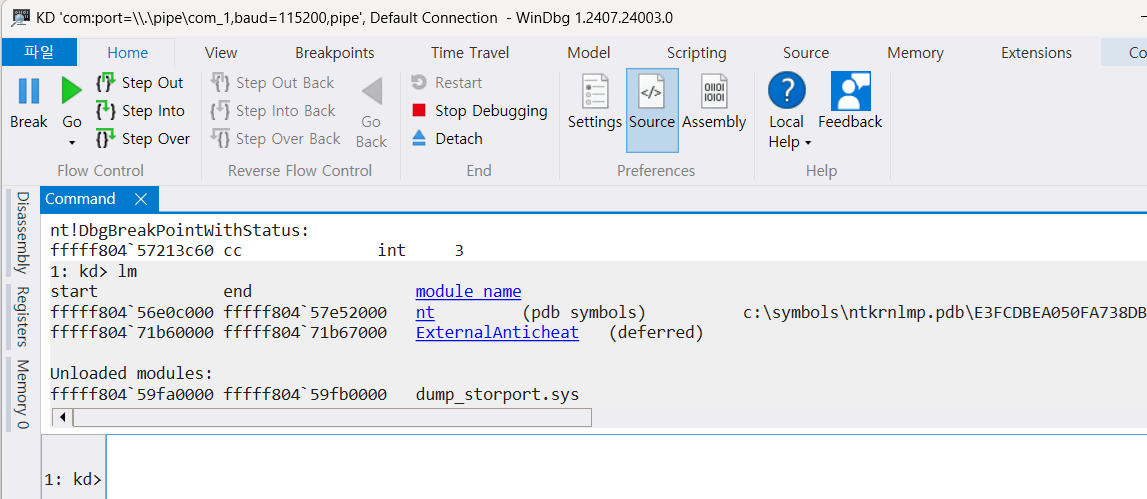
이 ExternalAnticheatStart가 다른 (집중 탐지용) 드라이버를 확실히 로드 시키는 것을 확인했다.
ExternalAnticheat.sys (집중 탐지용)
#include <ntddk.h> PVOID g_CallbackHandle = NULL; HANDLE processId = NULL; HANDLE pid; HANDLE internalPid = NULL; char MODE_NUM = 0; // MODE_NUM 0 normal mode // MODE_NUM 1 focus mode typedef enum _SYSTEM_INFORMATION_CLASS { SystemBasicInformation = 0, SystemPerformanceInformation = 2, SystemTimeOfDayInformation = 3, SystemProcessInformation = 5, SystemProcessorPerformanceInformation = 8, SystemInterruptInformation = 23, SystemExceptionInformation = 33, SystemRegistryQuotaInformation = 37, SystemLookasideInformation = 45, SystemCodeIntegrityInformation = 103, SystemPolicyInformation = 134, } SYSTEM_INFORMATION_CLASS; typedef struct _SYSTEM_PROCESS_INFORMATION { ULONG NextEntryOffset; ULONG NumberOfThreads; LARGE_INTEGER Reserved[3]; LARGE_INTEGER CreateTime; LARGE_INTEGER UserTime; LARGE_INTEGER KernelTime; UNICODE_STRING ImageName; ULONG BasePriority; HANDLE ProcessId; HANDLE InheritedFromProcessId; } SYSTEM_PROCESS_INFORMATION, * PSYSTEM_PROCESS_INFORMATION; NTSYSAPI NTSTATUS NTAPI ZwQuerySystemInformation( _In_ SYSTEM_INFORMATION_CLASS SystemInformationClass, _Out_writes_bytes_opt_(SystemInformationLength) PVOID SystemInformation, _In_ ULONG SystemInformationLength, _Out_opt_ PULONG ReturnLength ); HANDLE Get_pid_from_name() { NTSTATUS status = STATUS_SUCCESS; ULONG bufferSize = 0; PVOID buffer = NULL; PSYSTEM_PROCESS_INFORMATION pCurrent = NULL; UNICODE_STRING processName; RtlInitUnicodeString(&processName, L"Palworld.exe"); status = ZwQuerySystemInformation(SystemProcessInformation, buffer, bufferSize, &bufferSize); // 여기서 일부로 버퍼 크기를 틀리면 bufferSize 에 필요한 크기가 담겨서 온다. if (status == STATUS_INFO_LENGTH_MISMATCH) { buffer = ExAllocatePool2(POOL_FLAG_NON_PAGED, bufferSize, 'MDMP'); // 해당 bufferSize 만큼 할당 if (buffer == NULL) { DbgPrintEx(DPFLTR_IHVDRIVER_ID, DPFLTR_ERROR_LEVEL, "메모리 할당 실패\n"); return pCurrent; } else { status = ZwQuerySystemInformation(SystemProcessInformation, buffer, bufferSize, &bufferSize); // 진짜 가져오기 if (!NT_SUCCESS(status)) { DbgPrintEx(DPFLTR_IHVDRIVER_ID, DPFLTR_ERROR_LEVEL, "프로세스 정보 못가져옴 %p\n", status); ExFreePoolWithTag(buffer, 'MDMP'); return pCurrent; } } } else { } DbgPrintEx(DPFLTR_IHVDRIVER_ID, DPFLTR_ERROR_LEVEL, "프로세스 정보 가져옴\n"); pCurrent = (PSYSTEM_PROCESS_INFORMATION)buffer; while (pCurrent) { if (pCurrent->ImageName.Buffer != NULL) { if (RtlCompareUnicodeString(&(pCurrent->ImageName), &processName, TRUE) == 0) { DbgPrintEx(DPFLTR_IHVDRIVER_ID, DPFLTR_ERROR_LEVEL, "타겟 PID : %d\n", pCurrent->ProcessId); ExFreePoolWithTag(buffer, 'MDMP'); return pCurrent->ProcessId; } } if (pCurrent->NextEntryOffset == 0) { pCurrent = NULL; } else { pCurrent = (PSYSTEM_PROCESS_INFORMATION)(((PUCHAR)pCurrent) + pCurrent->NextEntryOffset); } } return pCurrent; } NTSTATUS SeLocateProcessImageName( PEPROCESS Process, PUNICODE_STRING* pImageFileName ); OB_PREOP_CALLBACK_STATUS PreOperationCallback(PVOID RegistrationContext, POB_PRE_OPERATION_INFORMATION OperationInformation) { //DbgPrint("Handle callback function invoke."); UNREFERENCED_PARAMETER(RegistrationContext); // 접근하려는 대상이 프로세스인지 확인 if (OperationInformation->ObjectType == *PsProcessType) { PEPROCESS targetProcess = (PEPROCESS)OperationInformation->Object; // 특정 프로세스에 대한 핸들 접근을 차단 -> FindProcessByName 함수로 가져온 pid 로 if (PsGetProcessId(targetProcess) == pid) { PEPROCESS currentProcess = PsGetCurrentProcess(); PUNICODE_STRING currentProcessName = NULL; SeLocateProcessImageName(currentProcess, ¤tProcessName); DbgPrint("handle 접근: %wZ\n", currentProcessName); // 프로세스 이름 출력 if (OperationInformation->Operation == OB_OPERATION_HANDLE_CREATE) { OperationInformation->Parameters->CreateHandleInformation.DesiredAccess = 0; // 접근 차단 DbgPrint("Blocking handle access BY ExternalAnticheat\n"); } } } return OB_PREOP_SUCCESS; } VOID RegisterCallbacks() { OB_CALLBACK_REGISTRATION callbackRegistration; OB_OPERATION_REGISTRATION operationRegistration; // 콜백 구조체 초기화 RtlZeroMemory(&callbackRegistration, sizeof(OB_CALLBACK_REGISTRATION)); RtlZeroMemory(&operationRegistration, sizeof(OB_OPERATION_REGISTRATION)); UNICODE_STRING altitude; RtlInitUnicodeString(&altitude, L"370000"); // Altitude 값을 더 높게 설정 // 콜백 등록에 필요한 구조체 세팅 callbackRegistration.Version = OB_FLT_REGISTRATION_VERSION; callbackRegistration.OperationRegistrationCount = 1; callbackRegistration.Altitude = altitude; callbackRegistration.RegistrationContext = NULL; operationRegistration.ObjectType = PsProcessType; // 프로세스 타입을 대상으로 설정 operationRegistration.Operations = OB_OPERATION_HANDLE_CREATE | OB_OPERATION_HANDLE_DUPLICATE; operationRegistration.PreOperation = PreOperationCallback; // 사전 콜백 함수 등록 operationRegistration.PostOperation = NULL; // 사후 콜백은 필요 없음 callbackRegistration.OperationRegistration = &operationRegistration; // 콜백 등록 NTSTATUS status = ObRegisterCallbacks(&callbackRegistration, &g_CallbackHandle); if (!NT_SUCCESS(status)) { DbgPrint("Failed to register callbacks. Status: %08x\n", status); } } VOID UnregisterCallbacks(PDRIVER_OBJECT DriverObject) { UNREFERENCED_PARAMETER(DriverObject); ObUnRegisterCallbacks(g_CallbackHandle); } NTSTATUS CheckAndAcquirePrivilege() { BOOLEAN hasPrivilege; // SeLoadDriverPrivilege: 드라이버를 로드할 때 필요한 권한 LUID luid = RtlConvertUlongToLuid(SE_LOAD_DRIVER_PRIVILEGE); // LUID는 각 권한에 고유한 식별자 // 권한을 확인합니다. hasPrivilege = SeSinglePrivilegeCheck(luid, UserMode); if (!hasPrivilege) { DbgPrint("SeLoadDriverPrivilege 권한이 없습니다."); return STATUS_ACCESS_DENIED; } DbgPrint("SeLoadDriverPrivilege 권한을 확인했습니다."); // 권한을 성공적으로 확인하면 STATUS_SUCCESS 반환 return STATUS_SUCCESS; } // 권한을 요청하는 부분 NTSTATUS AcquireDriverPrivilege() { //BOOLEAN wasEnabled; NTSTATUS status; // SeLoadDriverPrivilege 획득을 요청 status = SeSinglePrivilegeCheck(RtlConvertUlongToLuid(SE_LOAD_DRIVER_PRIVILEGE), UserMode); if (!NT_SUCCESS(status)) { DbgPrint("권한을 획득하지 못했습니다: 0x%x\n", status); return status; } DbgPrint("권한을 성공적으로 획득했습니다.\n"); return STATUS_SUCCESS; } NTSTATUS DriverEntry(PDRIVER_OBJECT DriverObject, PUNICODE_STRING RegistryPath) { UNREFERENCED_PARAMETER(RegistryPath); NTSTATUS Authstate = CheckAndAcquirePrivilege(); // 권한을 가지고 있는지 if (Authstate == STATUS_ACCESS_DENIED) { // 권한이 없다면 가져옴 AcquireDriverPrivilege(); } pid = Get_pid_from_name("Palworld.exe", &pid); if (pid != NULL ) { DbgPrint("Palworld PID: %d\n", pid); RegisterCallbacks(); DriverObject->DriverUnload = UnregisterCallbacks; } else { DbgPrint("Palworld process not found // ERROR \n"); } DbgPrint("Driver Loaded\n"); return STATUS_SUCCESS; }
핵심부분
프로세스 가져오기
Get_pid_from_name 현재 프로세스 목록에서 메모장 프로세스의 pid를 가져오는 함수이다.ZwQuerySystemInformation 함수를 사용해서 찾는 구조이다.자세히 보면
ZwQuerySystemInformation 함수를 2번 쓰는 것을 볼 수 있는데 이는 이 함수의 특수성 때문이다. 바로 버퍼의 크기가 맞지 않으면 결과로 STATUS_INFO_LENGTH_MISMATCH 플래그와 적당한 b버퍼 크기가 buffersize에 담겨서 온다. 따라서 ZwQuerySystemInformation 를 그냥 사용한뒤 오는 buffersize에 값에 대해 ExAllocatePool2 을 실행하여 메모리를 할당한다. ( malloc은 사용자 함수이고 얘는 커널 )핸들러 관련 함수 콜백함수 등록
RegisterCallbacks 함수에서 함수를 정의한다.이 부분은 이미
8월 31일 보고서 에 자세히 서술해 놓았다.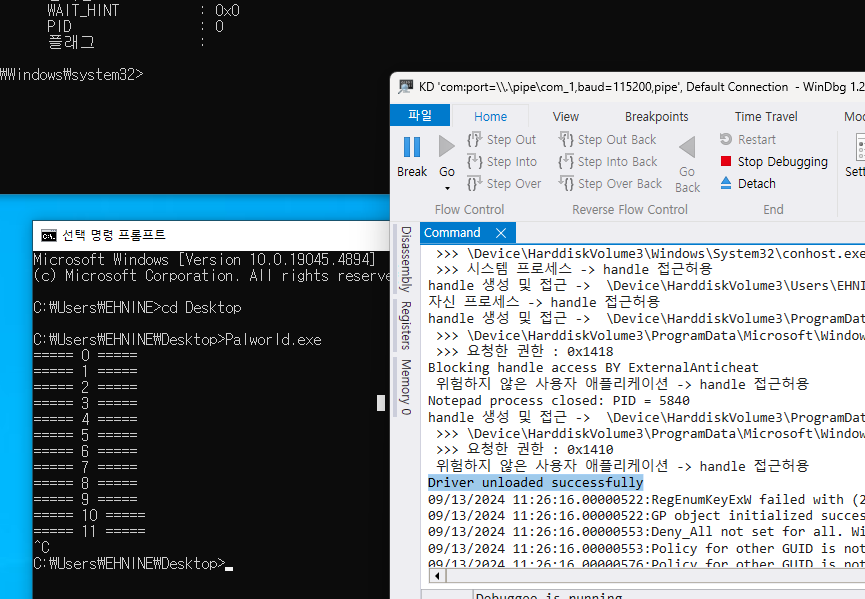
추가적으로 타겟 프로세스가 꺼지면 드라이버가 언로드 되는 것까지 성공적으로 구현하였다.
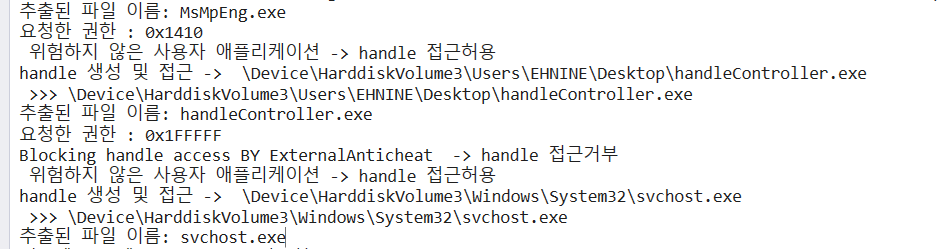
결과적으로 위험한 행위는 하는 handlecontroller.exe 를 잘 막아내었다.
문제 발생 및 문제 해결
9월 10일 미팅에서 현진님이 타겟 프로세스에 대한 모든핸들러를 막아버리면 커널에서 접근하는 핸들러도 막아버리고 추가적으로 디스코드, 스팀과 같은 게임 제공 업체와 게임 정보가 필요한 프로세스에서 접근하는 것도 막아버린다는 우려가 나왔다.
충분히 가능성이 있다. 일단 직접 실험을 해보니
→ 진짜 막힌다. ( 아예 프로그램이 실행이 안됨 )
해당 대응책 2개가 있다.
1. 화이트리스트 방식, 우리 안티치트가 안전하다가 인식한 프로세스는 화이트리스트에 넣어서 나머지 핸들러 접근을 막아버리는 것
2. 권한에 대한 수정, 지금은 모든 권한을 막아버리지만 실제 external 핵은 메모리 쓰기를 중심으로 게임을 조작하는 핵이다. 즉, 메모리 쓰기 권한을 막는다는 의견이다.
일단 문제를 해결하기 위해 어떤 핸들러가 기본적으로 접근하는지 알아보자
OB_PREOP_CALLBACK_STATUS PreOperationCallback(PVOID RegistrationContext, POB_PRE_OPERATION_INFORMATION OperationInformation) { //DbgPrint("Handle callback function invoke."); UNREFERENCED_PARAMETER(RegistrationContext); // 접근하려는 대상이 프로세스인지 확인 if (OperationInformation->ObjectType == *PsProcessType) { PEPROCESS targetProcess = (PEPROCESS)OperationInformation->Object; // 특정 프로세스에 대한 핸들 접근을 차단 -> FindProcessByName 함수로 가져온 pid 로 if (PsGetProcessId(targetProcess) == pid) { PEPROCESS currentProcess = PsGetCurrentProcess(); PUNICODE_STRING currentProcessName = NULL; SeLocateProcessImageName(currentProcess, ¤tProcessName); DbgPrint("handle 접근: %wZ\n", currentProcessName); // 프로세스 이름 출력 if (OperationInformation->Operation == OB_OPERATION_HANDLE_CREATE) { OperationInformation->Parameters->CreateHandleInformation.DesiredAccess = 0; // 접근 차단 DbgPrint("Blocking handle access BY ExternalAnticheat\n"); } } } return OB_PREOP_SUCCESS;
코드를 다음과 같이 수정하였다.
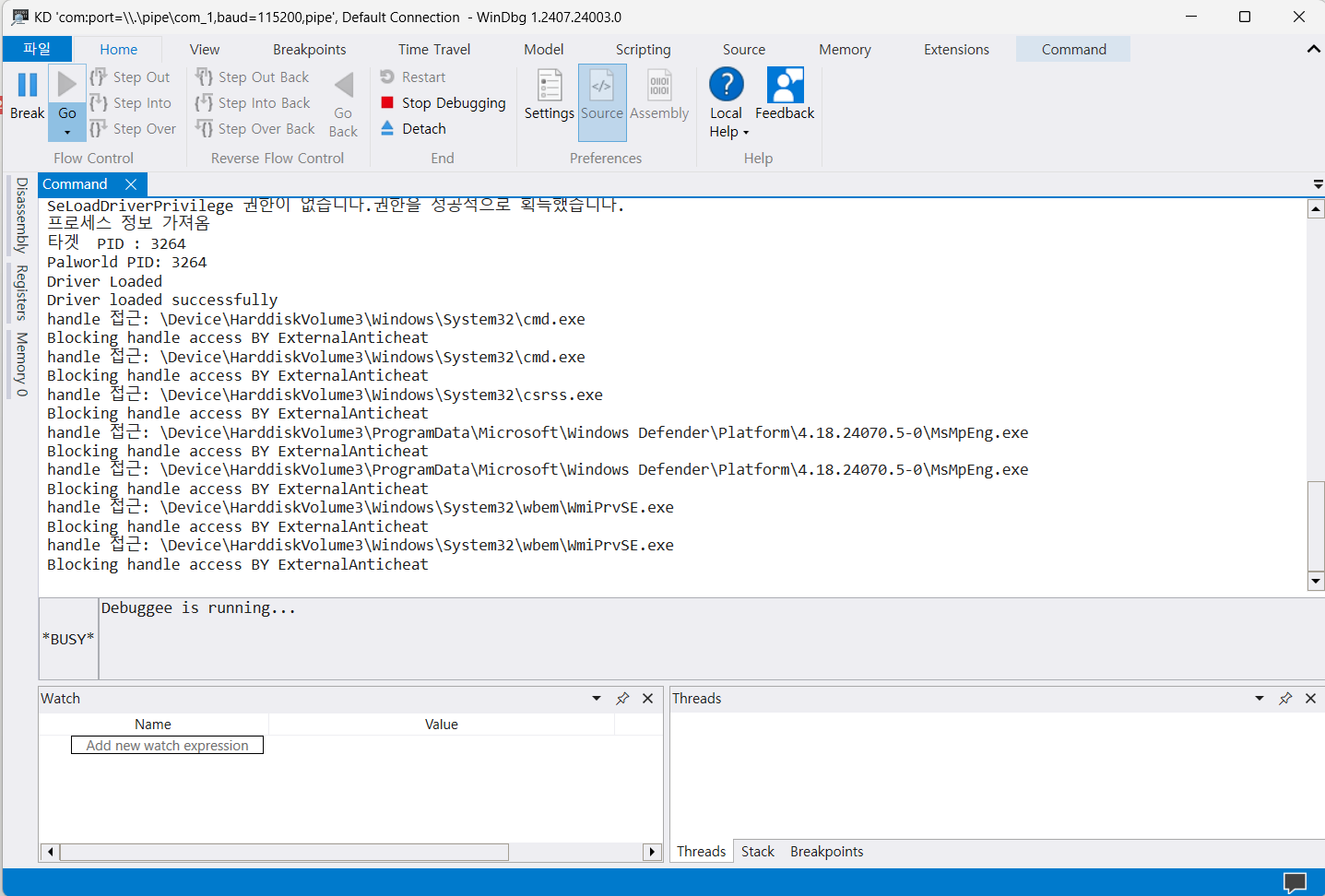
음, 생각보다 많은게 접근한다. 아마 프로그램 마다 다른게 접근 할것 같은데 좀 걱정이다.
일단 조금 더 Develop 해서 권한도 한번 파악해보자
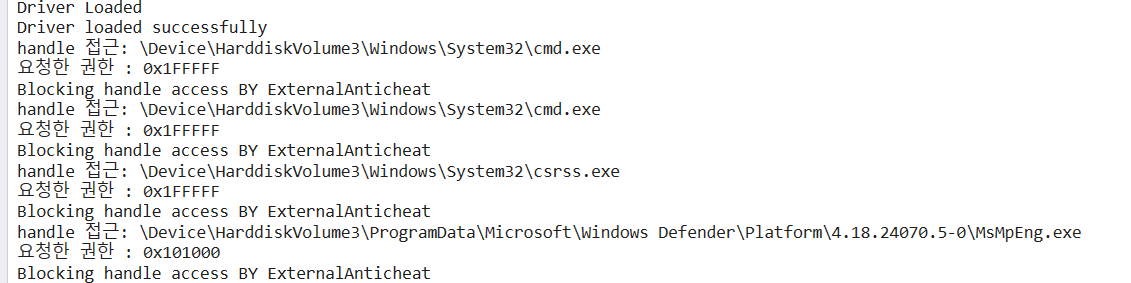
정말 다양한 종류의 요청을 하는데 공식 홈페이지에는
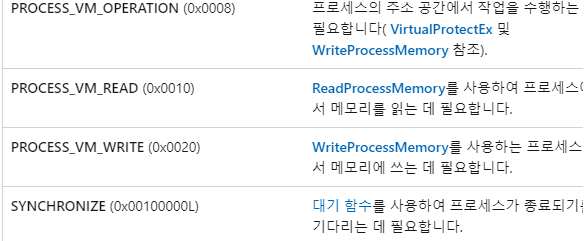
0x20 비트가 쓰기권한이라고 되어 있다. 또한 쓰기 권한만이 아닌 총 3개(
PROCESS_VM_WRITE , PROCESS_VM_OPERATION , PROCESS_DUP_HANDLE ) 의 권한에 대해서 제어를 실시 할 것이다. PROCESS_VM_WRITE : 메모리 쓰기 권한PROCESS_VM_OPERATION : 메모리 공간에 대한 변경 작업에 대한 권한, 위에서 다루었던 VirtualAllocEx 함수가 여기에 속한다.PROCESS_DUP_HANDLE : 해당 프로세스가 가지고 있는 핸들을 복사 할 수 있는 권한일단 먼저, 화이트리스트가 아닌 좀 다양한 방식으로 제작을 해보기 위해 디렉토리 명을 사용해 보았다. 즉, 디렉토리 명을 활용해 볼것이다.
그전에 위 사진에 있는 경로에 \Device\HarddiskVolume3 는 3번째로 매칭된 볼륨 C: 를 의미한다.
막간을 이용한 상식을 보자면,
PUNICODE_STRING 은 UNICODE_STRING 의 포인터 타입니다. 즉, PUNICODE_STRING 에는 주소가 들어가는 것따라서 사용할거면,
UNICODE_STRING SYSTEM32_PATH;

void InitSystem32Path() {
	RtlInitUnicodeString(&SYSTEM32_PATH, L"\\Device\\HarddiskVolume3\\Windows\\System32\\");
}
이런식으로 함수로 넣어주어야 한다.
따라서 내가 추가적으로 구현한것은 다음과 같다.
System32 폴더 안에 있는 프로그램에서 요구한다면 시스템 프로세스라고 판단
→ 핸들 허가
만약 시스템 프로세스가 아닌데
PROCESS_VM_WRITE , PROCESS_VM_OPERATION , PROCESS_DUP_HANDLE 를 요구한다?→ 핸들 불허
자기 자신에 대한 핸들러를 열러고 한다.
→ 핸들 허가
한번 실험으로 컴파일 한뒤 드라이버를 실행해보니
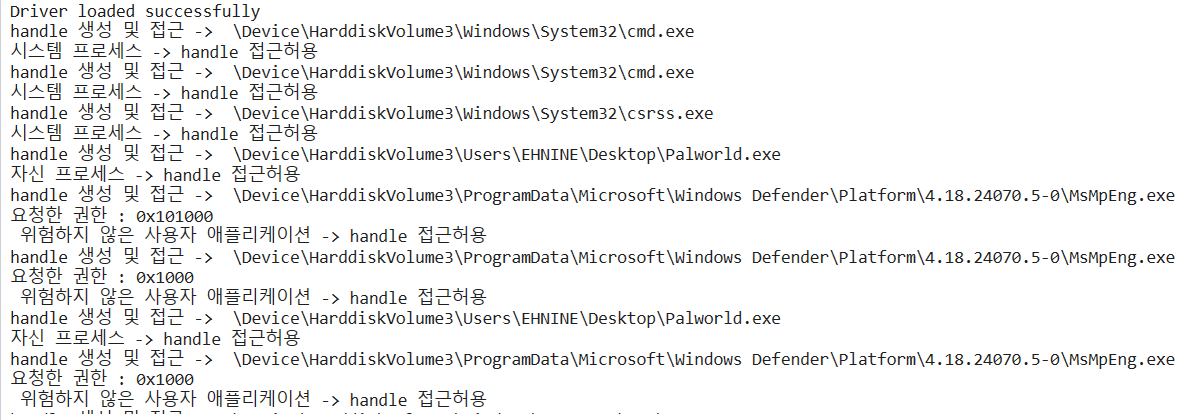
의도한 대로 시스템 프로세스에 대해서는 접근 허용 및 위험하지 않은 권한 플래그를 가진 프로세스에 대해서도 잘 허용하는 모습이다.
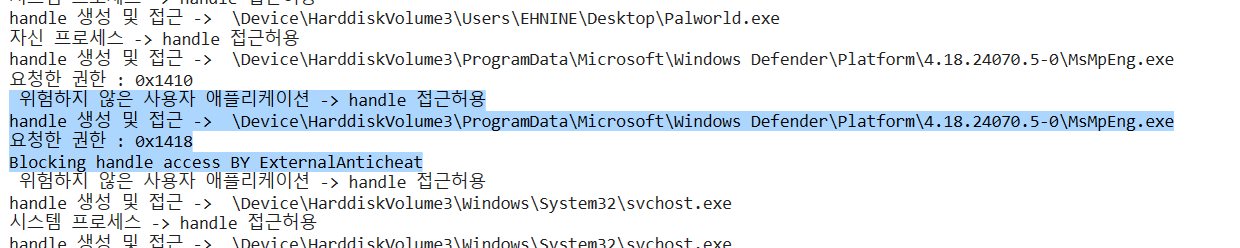
또한 외부인데 위험한 플래그를 가지고 있다면, 다음과 같이 잘 차단하는 모습이다.
일단, 지금은 Windows Defender의 위험한 권한을 막는 모습
하지만 , 이런 부분은 화이트 리스트에 추가하는 것 만으로도 충분하다.
따라서,
BOOLEAN IsInSystem32Directory(PUNICODE_STRING processName) {
	// 시스템 경로 동적 설정
	//if (system32Path.Buffer == NULL) {
	//	GetSystem32Directory(&system32Path);
	//}

	InitSystem32Path();
	if (RtlPrefixUnicodeString(&SYSTEM32_PATH, processName, TRUE)) {
		return TRUE;
	}
	return FALSE;
}

#define WHITELIST_SIZE 6 // 화이트리스트 크기 정의
UNICODE_STRING whiteListE[WHITELIST_SIZE];

void InitializeWhiteListExternal() {
	RtlInitUnicodeString(&whiteListE[0], L"steamservice.exe");
	RtlInitUnicodeString(&whiteListE[1], L"GameOverlayUI.exe");
	RtlInitUnicodeString(&whiteListE[2], L"steam.exe");
	RtlInitUnicodeString(&whiteListE[3], L"Palworld-Win64-Shipping.exe");
	RtlInitUnicodeString(&whiteListE[4], L"Palworld.exe");
	RtlInitUnicodeString(&whiteListE[5], L"MsMpEng.exe");
	//RtlInitUnicodeString(&whiteListE[6], L"GameBarFTServer.exe");
	//RtlInitUnicodeString(&whiteListE[8], L"Discord.exe");

}

BOOLEAN IsInWhiteList(PUNICODE_STRING processName) {
	//DbgPrint(" >>> %wZ\n", processName);

	// 전체 경로에서 마지막 '\' 이후의 파일 이름을 찾음
	USHORT i;
	for (i = processName->Length / sizeof(WCHAR); i > 0; i--) {
		if (processName->Buffer[i - 1] == L'\\') {
			break;
		}
	}

	// 파일 이름 부분의 시작 주소를 구함
	PWCHAR fileNameStart = &processName->Buffer[i];

	// 파일 이름을 UNICODE_STRING으로 만듦
	UNICODE_STRING fileName;
	RtlInitUnicodeString(&fileName, fileNameStart);

	// 추출된 파일 이름 출력
	DbgPrint("추출된 파일 이름: %wZ\n", &fileName);

	// 화이트리스트와 비교
	for (int t = 0; t < WHITELIST_SIZE; t++) {
		if (RtlEqualUnicodeString(&whiteListE[t], &fileName, TRUE)) {
			return TRUE; // 화이트리스트에 있는 경우
		}
	}

	return FALSE; // 화이트리스트에 없는 경우
}
다음과 같이 화이트리스트로 타겟 프로세스 진행에 필수적인 사용자 프로세스들을 추가해주었다.
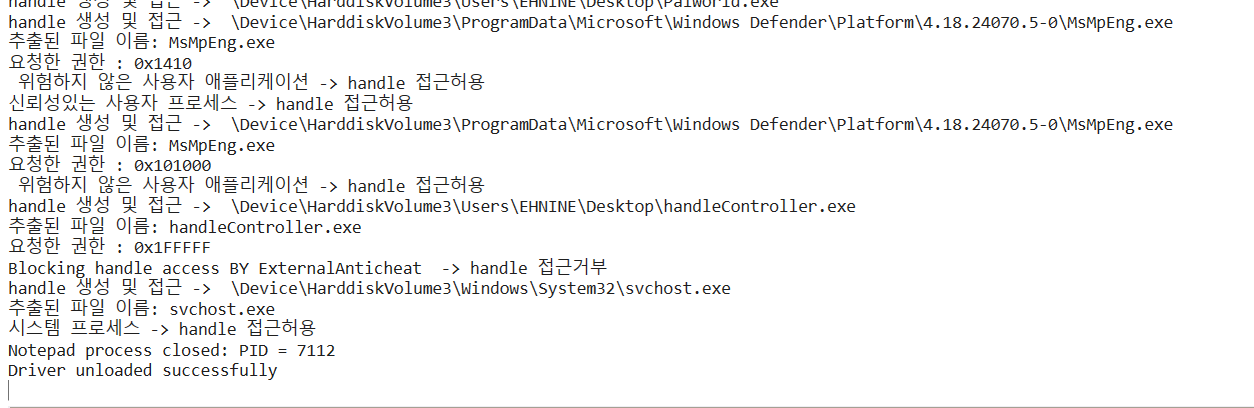
이제 MsMpEng 같은 윈도우 디펜더를 막지 않는다!
추가적인 문제 발견 및 피드백
ExternalAntiCheat.sys 에서
void InitSystem32Path() {
	RtlInitUnicodeString(&SYSTEM32_PATH, L"\\Device\\HarddiskVolume3\\Windows\\System32\\");
}
다음과 같이 매직넘버로 코딩 한 부분이 있는데 다른 컴퓨터에서는
HarddiskVolume3 가 아닌 다른 부분에 매핑이 될 수 있다. 다음부턴 이런 매직넘버는 없애고 모든 것을 동적으로 하도록 바꿔야겠다.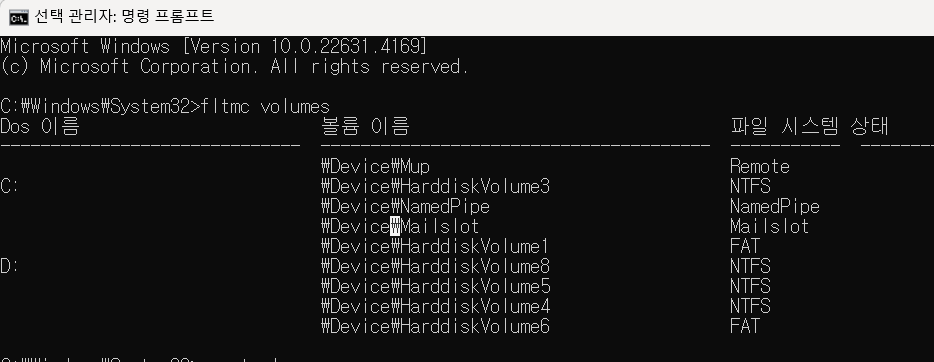
일단 가장 단순한 해결법은
fltmc volumes 명령어로 확인 하는 건데 이건 일시적인 해결법이다. 단순히 다른 환경에서 테스트를 위한 해결법.아 그리고 추가적으로 위와 같은 주소는 커널 모드 에서만 통용되는 주소다.
사용자 모드에서는 사용할 수 없으며,
mountvol 명령어로 사용자 모드 주소를 알 수 있다. 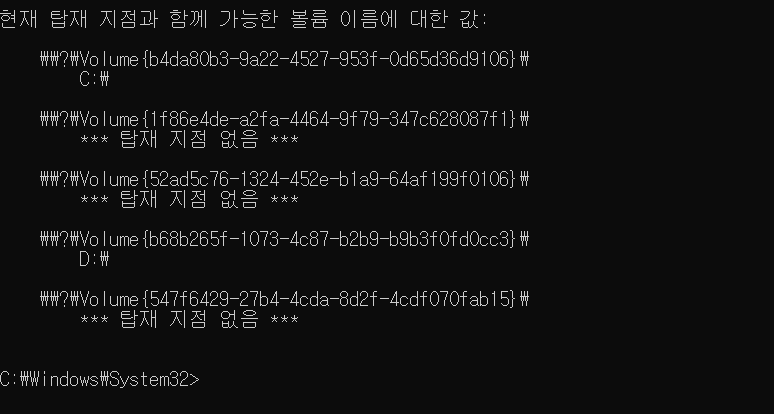
최종결과물
#include <ntddk.h> //#include <WinNT.h> #define PROCESS_VM_WRITE 0x0020 #define PROCESS_VM_OPERATION 0x0008 PVOID g_CallbackHandle = NULL; HANDLE processId = NULL; HANDLE pid; HANDLE internalPid = NULL; char MODE_NUM = 0; // MODE_NUM 0 normal mode // MODE_NUM 1 focus mode typedef enum _SYSTEM_INFORMATION_CLASS { SystemBasicInformation = 0, SystemPerformanceInformation = 2, SystemTimeOfDayInformation = 3, SystemProcessInformation = 5, SystemProcessorPerformanceInformation = 8, SystemInterruptInformation = 23, SystemExceptionInformation = 33, SystemRegistryQuotaInformation = 37, SystemLookasideInformation = 45, SystemCodeIntegrityInformation = 103, SystemPolicyInformation = 134, } SYSTEM_INFORMATION_CLASS; typedef struct _SYSTEM_PROCESS_INFORMATION { ULONG NextEntryOffset; ULONG NumberOfThreads; LARGE_INTEGER Reserved[3]; LARGE_INTEGER CreateTime; LARGE_INTEGER UserTime; LARGE_INTEGER KernelTime; UNICODE_STRING ImageName; ULONG BasePriority; HANDLE ProcessId; HANDLE InheritedFromProcessId; } SYSTEM_PROCESS_INFORMATION, * PSYSTEM_PROCESS_INFORMATION; NTSYSAPI NTSTATUS NTAPI ZwQuerySystemInformation( _In_ SYSTEM_INFORMATION_CLASS SystemInformationClass, _Out_writes_bytes_opt_(SystemInformationLength) PVOID SystemInformation, _In_ ULONG SystemInformationLength, _Out_opt_ PULONG ReturnLength ); HANDLE Get_pid_from_name() { NTSTATUS status = STATUS_SUCCESS; ULONG bufferSize = 0; PVOID buffer = NULL; PSYSTEM_PROCESS_INFORMATION pCurrent = NULL; UNICODE_STRING processName; RtlInitUnicodeString(&processName, L"Palworld.exe"); status = ZwQuerySystemInformation(SystemProcessInformation, buffer, bufferSize, &bufferSize); // 여기서 일부로 버퍼 크기를 틀리면 bufferSize 에 필요한 크기가 담겨서 온다. if (status == STATUS_INFO_LENGTH_MISMATCH) { buffer = ExAllocatePool2(POOL_FLAG_NON_PAGED, bufferSize, 'MDMP'); // 해당 bufferSize 만큼 할당 if (buffer == NULL) { DbgPrintEx(DPFLTR_IHVDRIVER_ID, DPFLTR_ERROR_LEVEL, "메모리 할당 실패\n"); return pCurrent; } else { status = ZwQuerySystemInformation(SystemProcessInformation, buffer, bufferSize, &bufferSize); // 진짜 가져오기 if (!NT_SUCCESS(status)) { DbgPrintEx(DPFLTR_IHVDRIVER_ID, DPFLTR_ERROR_LEVEL, "프로세스 정보 못가져옴 %p\n", status); ExFreePoolWithTag(buffer, 'MDMP'); return pCurrent; } } } else { } DbgPrintEx(DPFLTR_IHVDRIVER_ID, DPFLTR_ERROR_LEVEL, "프로세스 정보 가져옴\n"); pCurrent = (PSYSTEM_PROCESS_INFORMATION)buffer; while (pCurrent) { if (pCurrent->ImageName.Buffer != NULL) { if (RtlCompareUnicodeString(&(pCurrent->ImageName), &processName, TRUE) == 0) { DbgPrintEx(DPFLTR_IHVDRIVER_ID, DPFLTR_ERROR_LEVEL, "타겟 PID : %d\n", pCurrent->ProcessId); ExFreePoolWithTag(buffer, 'MDMP'); return pCurrent->ProcessId; } } if (pCurrent->NextEntryOffset == 0) { pCurrent = NULL; } else { pCurrent = (PSYSTEM_PROCESS_INFORMATION)(((PUCHAR)pCurrent) + pCurrent->NextEntryOffset); } } return pCurrent; } NTSTATUS SeLocateProcessImageName( PEPROCESS Process, PUNICODE_STRING* pImageFileName ); UNICODE_STRING SYSTEM32_PATH; void InitSystem32Path() { RtlInitUnicodeString(&SYSTEM32_PATH, L"\\Device\\HarddiskVolume3\\Windows\\System32\\"); } //UNICODE_STRING system32Path = NULL; // //// 시스템 디렉터리 경로 가져오기 //NTSTATUS GetSystem32Directory(PUNICODE_STRING system32Path) { // UNICODE_STRING windowsDirectory; // RtlInitUnicodeString(&windowsDirectory, L"\\SystemRoot\\System32"); // // return RtlDosPathNameToNtPathName_U(windowsDirectory.Buffer, system32Path, NULL, NULL); //} BOOLEAN IsInSystem32Directory(PUNICODE_STRING processName) { // 시스템 경로 동적 설정 //if (system32Path.Buffer == NULL) { // GetSystem32Directory(&system32Path); //} InitSystem32Path(); if (RtlPrefixUnicodeString(&SYSTEM32_PATH, processName, TRUE)) { return TRUE; } return FALSE; } #define WHITELIST_SIZE 6 // 화이트리스트 크기 정의 UNICODE_STRING whiteListE[WHITELIST_SIZE]; void InitializeWhiteListExternal() { RtlInitUnicodeString(&whiteListE[0], L"steamservice.exe"); RtlInitUnicodeString(&whiteListE[1], L"GameOverlayUI.exe"); RtlInitUnicodeString(&whiteListE[2], L"steam.exe"); RtlInitUnicodeString(&whiteListE[3], L"Palworld-Win64-Shipping.exe"); RtlInitUnicodeString(&whiteListE[4], L"Palworld.exe"); RtlInitUnicodeString(&whiteListE[5], L"MsMpEng.exe"); //RtlInitUnicodeString(&whiteListE[6], L"GameBarFTServer.exe"); //RtlInitUnicodeString(&whiteListE[8], L"Discord.exe"); } //PUNICODE_STRING ExtractFileNameFromPath(PUNICODE_STRING fullPath) { // USHORT i; // for (i = fullPath->Length / sizeof(WCHAR); i > 0; i--) { // DbgPrint(" >>> %d\n", i); // if (fullPath->Buffer[i - 1] == L'\\') { // break; // } // } // // return (PUNICODE_STRING)&fullPath->Buffer[i]; //} //BOOLEAN IsInWhiteList(PUNICODE_STRING processName) { // DbgPrint(" >>> %wZ\n", processName); // //PUNICODE_STRING fileName = ExtractFileNameFromPath(processName); // //UNICODE_STRING fileNameUnicodeString; // //RtlInitUnicodeString(&fileNameUnicodeString, fileName); // //DbgPrint(" >>> %wZ\n", fileNameUnicodeString); // for (int i = 0; i < WHITELIST_SIZE; i++) { // if (IsSubstring(&whiteListE[i], processName, TRUE)) { // return TRUE; // 화이트리스트에 있는 경우 // } // } // return FALSE; // 화이트리스트에 없는 경우 //} BOOLEAN IsInWhiteList(PUNICODE_STRING processName) { //DbgPrint(" >>> %wZ\n", processName); // 전체 경로에서 마지막 '\' 이후의 파일 이름을 찾음 USHORT i; for (i = processName->Length / sizeof(WCHAR); i > 0; i--) { if (processName->Buffer[i - 1] == L'\\') { break; } } // 파일 이름 부분의 시작 주소를 구함 PWCHAR fileNameStart = &processName->Buffer[i]; // 파일 이름을 UNICODE_STRING으로 만듦 UNICODE_STRING fileName; RtlInitUnicodeString(&fileName, fileNameStart); // 추출된 파일 이름 출력 DbgPrint("추출된 파일 이름: %wZ\n", &fileName); // 화이트리스트와 비교 for (int t = 0; t < WHITELIST_SIZE; t++) { if (RtlEqualUnicodeString(&whiteListE[t], &fileName, TRUE)) { return TRUE; // 화이트리스트에 있는 경우 } } return FALSE; // 화이트리스트에 없는 경우 } OB_PREOP_CALLBACK_STATUS PreOperationCallback(PVOID RegistrationContext, POB_PRE_OPERATION_INFORMATION OperationInformation) { //DbgPrint("Handle callback function invoke."); UNREFERENCED_PARAMETER(RegistrationContext); // 접근하려는 대상이 프로세스인지 확인 if (OperationInformation->ObjectType == *PsProcessType) { PEPROCESS targetProcess = (PEPROCESS)OperationInformation->Object; // 특정 프로세스에 대한 핸들 접근을 차단 -> FindProcessByName 함수로 가져온 pid 로 if (PsGetProcessId(targetProcess) == pid) { PEPROCESS currentProcess = PsGetCurrentProcess(); PUNICODE_STRING currentProcessName = NULL; SeLocateProcessImageName(currentProcess, ¤tProcessName); if (OperationInformation->Operation == OB_OPERATION_HANDLE_CREATE) { DbgPrint("handle 생성 및 접근 -> %wZ\n", currentProcessName); // 프로세스 이름 출력 if (PsGetCurrentProcess() == targetProcess || IsInWhiteList(currentProcessName)) { DbgPrint("신뢰성있는 사용자 프로세스 -> handle 접근허용\n"); // 여기에 화이트리스트 구현해도 될듯 } else if (!IsInSystem32Directory(currentProcessName) ){ ULONG desiredAccess = OperationInformation->Parameters->CreateHandleInformation.DesiredAccess; DbgPrint("요청한 권한 : 0x%X\n", desiredAccess); if ((desiredAccess & PROCESS_VM_WRITE) || (desiredAccess & PROCESS_VM_OPERATION) || (desiredAccess & PROCESS_DUP_HANDLE)) { // 쓰기 권한 접근 차단 OperationInformation->Parameters->CreateHandleInformation.DesiredAccess = 0; // 접근 차단 DbgPrint("Blocking handle access BY ExternalAnticheat -> handle 접근거부 \n"); } else { DbgPrint(" 위험하지 않은 사용자 애플리케이션 -> handle 접근허용\n"); } } else { DbgPrint("시스템 프로세스 -> handle 접근허용\n"); } } } } return OB_PREOP_SUCCESS; } VOID RegisterCallbacks() { OB_CALLBACK_REGISTRATION callbackRegistration; OB_OPERATION_REGISTRATION operationRegistration; // 콜백 구조체 초기화 RtlZeroMemory(&callbackRegistration, sizeof(OB_CALLBACK_REGISTRATION)); RtlZeroMemory(&operationRegistration, sizeof(OB_OPERATION_REGISTRATION)); UNICODE_STRING altitude; RtlInitUnicodeString(&altitude, L"370000"); // Altitude 값을 더 높게 설정 // 콜백 등록에 필요한 구조체 세팅 callbackRegistration.Version = OB_FLT_REGISTRATION_VERSION; callbackRegistration.OperationRegistrationCount = 1; callbackRegistration.Altitude = altitude; callbackRegistration.RegistrationContext = NULL; operationRegistration.ObjectType = PsProcessType; // 프로세스 타입을 대상으로 설정 operationRegistration.Operations = OB_OPERATION_HANDLE_CREATE | OB_OPERATION_HANDLE_DUPLICATE; operationRegistration.PreOperation = PreOperationCallback; // 사전 콜백 함수 등록 operationRegistration.PostOperation = NULL; // 사후 콜백은 필요 없음 callbackRegistration.OperationRegistration = &operationRegistration; // 콜백 등록 NTSTATUS status = ObRegisterCallbacks(&callbackRegistration, &g_CallbackHandle); if (!NT_SUCCESS(status)) { DbgPrint("Failed to register callbacks. Status: %08x\n", status); } } VOID UnregisterCallbacks(PDRIVER_OBJECT DriverObject) { UNREFERENCED_PARAMETER(DriverObject); ObUnRegisterCallbacks(g_CallbackHandle); } NTSTATUS CheckAndAcquirePrivilege() { BOOLEAN hasPrivilege; // SeLoadDriverPrivilege: 드라이버를 로드할 때 필요한 권한 LUID luid = RtlConvertUlongToLuid(SE_LOAD_DRIVER_PRIVILEGE); // LUID는 각 권한에 고유한 식별자 // 권한을 확인합니다. hasPrivilege = SeSinglePrivilegeCheck(luid, UserMode); if (!hasPrivilege) { DbgPrint("SeLoadDriverPrivilege 권한이 없습니다."); return STATUS_ACCESS_DENIED; } DbgPrint("SeLoadDriverPrivilege 권한을 확인했습니다."); // 권한을 성공적으로 확인하면 STATUS_SUCCESS 반환 return STATUS_SUCCESS; } // 권한을 요청하는 부분 NTSTATUS AcquireDriverPrivilege() { //BOOLEAN wasEnabled; NTSTATUS status; // SeLoadDriverPrivilege 획득을 요청 status = SeSinglePrivilegeCheck(RtlConvertUlongToLuid(SE_LOAD_DRIVER_PRIVILEGE), UserMode); if (!NT_SUCCESS(status)) { DbgPrint("권한을 획득하지 못했습니다: 0x%x\n", status); return status; } DbgPrint("권한을 성공적으로 획득했습니다.\n"); return STATUS_SUCCESS; } NTSTATUS DriverEntry(PDRIVER_OBJECT DriverObject, PUNICODE_STRING RegistryPath) { UNREFERENCED_PARAMETER(RegistryPath); NTSTATUS Authstate = CheckAndAcquirePrivilege(); // 권한을 가지고 있는지 if (Authstate == STATUS_ACCESS_DENIED) { // 권한이 없다면 가져옴 AcquireDriverPrivilege(); } pid = Get_pid_from_name("Palworld.exe", &pid); if (pid != NULL ) { DbgPrint("Palworld PID: %d\n", pid); RegisterCallbacks(); DriverObject->DriverUnload = UnregisterCallbacks; } else { DbgPrint("Palworld process not found // ERROR \n"); } DbgPrint("Driver Loaded\n"); return STATUS_SUCCESS; }
#include <ntddk.h> //#include <WinNT.h> #define PROCESS_VM_WRITE 0x0020 #define PROCESS_VM_OPERATION 0x0008 PVOID g_CallbackHandle = NULL; HANDLE processId = NULL; HANDLE pid; HANDLE internalPid = NULL; char MODE_NUM = 0; // MODE_NUM 0 normal mode // MODE_NUM 1 focus mode typedef enum _SYSTEM_INFORMATION_CLASS { SystemBasicInformation = 0, SystemPerformanceInformation = 2, SystemTimeOfDayInformation = 3, SystemProcessInformation = 5, SystemProcessorPerformanceInformation = 8, SystemInterruptInformation = 23, SystemExceptionInformation = 33, SystemRegistryQuotaInformation = 37, SystemLookasideInformation = 45, SystemCodeIntegrityInformation = 103, SystemPolicyInformation = 134, } SYSTEM_INFORMATION_CLASS; typedef struct _SYSTEM_PROCESS_INFORMATION { ULONG NextEntryOffset; ULONG NumberOfThreads; LARGE_INTEGER Reserved[3]; LARGE_INTEGER CreateTime; LARGE_INTEGER UserTime; LARGE_INTEGER KernelTime; UNICODE_STRING ImageName; ULONG BasePriority; HANDLE ProcessId; HANDLE InheritedFromProcessId; } SYSTEM_PROCESS_INFORMATION, * PSYSTEM_PROCESS_INFORMATION; NTSYSAPI NTSTATUS NTAPI ZwQuerySystemInformation( _In_ SYSTEM_INFORMATION_CLASS SystemInformationClass, _Out_writes_bytes_opt_(SystemInformationLength) PVOID SystemInformation, _In_ ULONG SystemInformationLength, _Out_opt_ PULONG ReturnLength ); HANDLE Get_pid_from_name() { NTSTATUS status = STATUS_SUCCESS; ULONG bufferSize = 0; PVOID buffer = NULL; PSYSTEM_PROCESS_INFORMATION pCurrent = NULL; UNICODE_STRING processName; RtlInitUnicodeString(&processName, L"Palworld.exe"); status = ZwQuerySystemInformation(SystemProcessInformation, buffer, bufferSize, &bufferSize); // 여기서 일부로 버퍼 크기를 틀리면 bufferSize 에 필요한 크기가 담겨서 온다. if (status == STATUS_INFO_LENGTH_MISMATCH) { buffer = ExAllocatePool2(POOL_FLAG_NON_PAGED, bufferSize, 'MDMP'); // 해당 bufferSize 만큼 할당 if (buffer == NULL) { DbgPrintEx(DPFLTR_IHVDRIVER_ID, DPFLTR_ERROR_LEVEL, "메모리 할당 실패\n"); return pCurrent; } else { status = ZwQuerySystemInformation(SystemProcessInformation, buffer, bufferSize, &bufferSize); // 진짜 가져오기 if (!NT_SUCCESS(status)) { DbgPrintEx(DPFLTR_IHVDRIVER_ID, DPFLTR_ERROR_LEVEL, "프로세스 정보 못가져옴 %p\n", status); ExFreePoolWithTag(buffer, 'MDMP'); return pCurrent; } } } else { } DbgPrintEx(DPFLTR_IHVDRIVER_ID, DPFLTR_ERROR_LEVEL, "프로세스 정보 가져옴\n"); pCurrent = (PSYSTEM_PROCESS_INFORMATION)buffer; while (pCurrent) { if (pCurrent->ImageName.Buffer != NULL) { if (RtlCompareUnicodeString(&(pCurrent->ImageName), &processName, TRUE) == 0) { DbgPrintEx(DPFLTR_IHVDRIVER_ID, DPFLTR_ERROR_LEVEL, "타겟 PID : %d\n", pCurrent->ProcessId); ExFreePoolWithTag(buffer, 'MDMP'); return pCurrent->ProcessId; } } if (pCurrent->NextEntryOffset == 0) { pCurrent = NULL; } else { pCurrent = (PSYSTEM_PROCESS_INFORMATION)(((PUCHAR)pCurrent) + pCurrent->NextEntryOffset); } } return pCurrent; } NTSTATUS SeLocateProcessImageName( PEPROCESS Process, PUNICODE_STRING* pImageFileName ); UNICODE_STRING SYSTEM32_PATH; void InitSystem32Path() { RtlInitUnicodeString(&SYSTEM32_PATH, L"\\Device\\HarddiskVolume3\\Windows\\System32\\"); } //UNICODE_STRING system32Path = NULL; // //// 시스템 디렉터리 경로 가져오기 //NTSTATUS GetSystem32Directory(PUNICODE_STRING system32Path) { // UNICODE_STRING windowsDirectory; // RtlInitUnicodeString(&windowsDirectory, L"\\SystemRoot\\System32"); // // return RtlDosPathNameToNtPathName_U(windowsDirectory.Buffer, system32Path, NULL, NULL); //} BOOLEAN IsInSystem32Directory(PUNICODE_STRING processName) { // 시스템 경로 동적 설정 //if (system32Path.Buffer == NULL) { // GetSystem32Directory(&system32Path); //} InitSystem32Path(); if (RtlPrefixUnicodeString(&SYSTEM32_PATH, processName, TRUE)) { return TRUE; } return FALSE; } #define WHITELIST_SIZE 6 // 화이트리스트 크기 정의 UNICODE_STRING whiteListE[WHITELIST_SIZE]; void InitializeWhiteListExternal() { RtlInitUnicodeString(&whiteListE[0], L"steamservice.exe"); RtlInitUnicodeString(&whiteListE[1], L"GameOverlayUI.exe"); RtlInitUnicodeString(&whiteListE[2], L"steam.exe"); RtlInitUnicodeString(&whiteListE[3], L"Palworld-Win64-Shipping.exe"); RtlInitUnicodeString(&whiteListE[4], L"Palworld.exe"); RtlInitUnicodeString(&whiteListE[5], L"MsMpEng.exe"); //RtlInitUnicodeString(&whiteListE[6], L"GameBarFTServer.exe"); //RtlInitUnicodeString(&whiteListE[8], L"Discord.exe"); } //PUNICODE_STRING ExtractFileNameFromPath(PUNICODE_STRING fullPath) { // USHORT i; // for (i = fullPath->Length / sizeof(WCHAR); i > 0; i--) { // DbgPrint(" >>> %d\n", i); // if (fullPath->Buffer[i - 1] == L'\\') { // break; // } // } // // return (PUNICODE_STRING)&fullPath->Buffer[i]; //} //BOOLEAN IsInWhiteList(PUNICODE_STRING processName) { // DbgPrint(" >>> %wZ\n", processName); // //PUNICODE_STRING fileName = ExtractFileNameFromPath(processName); // //UNICODE_STRING fileNameUnicodeString; // //RtlInitUnicodeString(&fileNameUnicodeString, fileName); // //DbgPrint(" >>> %wZ\n", fileNameUnicodeString); // for (int i = 0; i < WHITELIST_SIZE; i++) { // if (IsSubstring(&whiteListE[i], processName, TRUE)) { // return TRUE; // 화이트리스트에 있는 경우 // } // } // return FALSE; // 화이트리스트에 없는 경우 //} BOOLEAN IsInWhiteList(PUNICODE_STRING processName) { //DbgPrint(" >>> %wZ\n", processName); // 전체 경로에서 마지막 '\' 이후의 파일 이름을 찾음 USHORT i; for (i = processName->Length / sizeof(WCHAR); i > 0; i--) { if (processName->Buffer[i - 1] == L'\\') { break; } } // 파일 이름 부분의 시작 주소를 구함 PWCHAR fileNameStart = &processName->Buffer[i]; // 파일 이름을 UNICODE_STRING으로 만듦 UNICODE_STRING fileName; RtlInitUnicodeString(&fileName, fileNameStart); // 추출된 파일 이름 출력 DbgPrint("추출된 파일 이름: %wZ\n", &fileName); // 화이트리스트와 비교 for (int t = 0; t < WHITELIST_SIZE; t++) { if (RtlEqualUnicodeString(&whiteListE[t], &fileName, TRUE)) { return TRUE; // 화이트리스트에 있는 경우 } } return FALSE; // 화이트리스트에 없는 경우 } OB_PREOP_CALLBACK_STATUS PreOperationCallback(PVOID RegistrationContext, POB_PRE_OPERATION_INFORMATION OperationInformation) { //DbgPrint("Handle callback function invoke."); UNREFERENCED_PARAMETER(RegistrationContext); // 접근하려는 대상이 프로세스인지 확인 if (OperationInformation->ObjectType == *PsProcessType) { PEPROCESS targetProcess = (PEPROCESS)OperationInformation->Object; // 특정 프로세스에 대한 핸들 접근을 차단 -> FindProcessByName 함수로 가져온 pid 로 if (PsGetProcessId(targetProcess) == pid) { PEPROCESS currentProcess = PsGetCurrentProcess(); PUNICODE_STRING currentProcessName = NULL; SeLocateProcessImageName(currentProcess, ¤tProcessName); if (OperationInformation->Operation == OB_OPERATION_HANDLE_CREATE) { DbgPrint("handle 생성 및 접근 -> %wZ\n", currentProcessName); // 프로세스 이름 출력 if (PsGetCurrentProcess() == targetProcess || IsInWhiteList(currentProcessName)) { DbgPrint("신뢰성있는 사용자 프로세스 -> handle 접근허용\n"); // 여기에 화이트리스트 구현해도 될듯 } else if (!IsInSystem32Directory(currentProcessName) ){ ULONG desiredAccess = OperationInformation->Parameters->CreateHandleInformation.DesiredAccess; DbgPrint("요청한 권한 : 0x%X\n", desiredAccess); if ((desiredAccess & PROCESS_VM_WRITE) || (desiredAccess & PROCESS_VM_OPERATION) || (desiredAccess & PROCESS_DUP_HANDLE)) { // 쓰기 권한 접근 차단 OperationInformation->Parameters->CreateHandleInformation.DesiredAccess = 0; // 접근 차단 DbgPrint("Blocking handle access BY ExternalAnticheat -> handle 접근거부 \n"); } else { DbgPrint(" 위험하지 않은 사용자 애플리케이션 -> handle 접근허용\n"); } } else { DbgPrint("시스템 프로세스 -> handle 접근허용\n"); } } } } return OB_PREOP_SUCCESS; } VOID RegisterCallbacks() { OB_CALLBACK_REGISTRATION callbackRegistration; OB_OPERATION_REGISTRATION operationRegistration; // 콜백 구조체 초기화 RtlZeroMemory(&callbackRegistration, sizeof(OB_CALLBACK_REGISTRATION)); RtlZeroMemory(&operationRegistration, sizeof(OB_OPERATION_REGISTRATION)); UNICODE_STRING altitude; RtlInitUnicodeString(&altitude, L"370000"); // Altitude 값을 더 높게 설정 // 콜백 등록에 필요한 구조체 세팅 callbackRegistration.Version = OB_FLT_REGISTRATION_VERSION; callbackRegistration.OperationRegistrationCount = 1; callbackRegistration.Altitude = altitude; callbackRegistration.RegistrationContext = NULL; operationRegistration.ObjectType = PsProcessType; // 프로세스 타입을 대상으로 설정 operationRegistration.Operations = OB_OPERATION_HANDLE_CREATE | OB_OPERATION_HANDLE_DUPLICATE; operationRegistration.PreOperation = PreOperationCallback; // 사전 콜백 함수 등록 operationRegistration.PostOperation = NULL; // 사후 콜백은 필요 없음 callbackRegistration.OperationRegistration = &operationRegistration; // 콜백 등록 NTSTATUS status = ObRegisterCallbacks(&callbackRegistration, &g_CallbackHandle); if (!NT_SUCCESS(status)) { DbgPrint("Failed to register callbacks. Status: %08x\n", status); } } VOID UnregisterCallbacks(PDRIVER_OBJECT DriverObject) { UNREFERENCED_PARAMETER(DriverObject); ObUnRegisterCallbacks(g_CallbackHandle); } NTSTATUS CheckAndAcquirePrivilege() { BOOLEAN hasPrivilege; // SeLoadDriverPrivilege: 드라이버를 로드할 때 필요한 권한 LUID luid = RtlConvertUlongToLuid(SE_LOAD_DRIVER_PRIVILEGE); // LUID는 각 권한에 고유한 식별자 // 권한을 확인합니다. hasPrivilege = SeSinglePrivilegeCheck(luid, UserMode); if (!hasPrivilege) { DbgPrint("SeLoadDriverPrivilege 권한이 없습니다."); return STATUS_ACCESS_DENIED; } DbgPrint("SeLoadDriverPrivilege 권한을 확인했습니다."); // 권한을 성공적으로 확인하면 STATUS_SUCCESS 반환 return STATUS_SUCCESS; } // 권한을 요청하는 부분 NTSTATUS AcquireDriverPrivilege() { //BOOLEAN wasEnabled; NTSTATUS status; // SeLoadDriverPrivilege 획득을 요청 status = SeSinglePrivilegeCheck(RtlConvertUlongToLuid(SE_LOAD_DRIVER_PRIVILEGE), UserMode); if (!NT_SUCCESS(status)) { DbgPrint("권한을 획득하지 못했습니다: 0x%x\n", status); return status; } DbgPrint("권한을 성공적으로 획득했습니다.\n"); return STATUS_SUCCESS; } NTSTATUS DriverEntry(PDRIVER_OBJECT DriverObject, PUNICODE_STRING RegistryPath) { UNREFERENCED_PARAMETER(RegistryPath); NTSTATUS Authstate = CheckAndAcquirePrivilege(); // 권한을 가지고 있는지 if (Authstate == STATUS_ACCESS_DENIED) { // 권한이 없다면 가져옴 AcquireDriverPrivilege(); } pid = Get_pid_from_name("Palworld.exe", &pid); if (pid != NULL ) { DbgPrint("Palworld PID: %d\n", pid); RegisterCallbacks(); DriverObject->DriverUnload = UnregisterCallbacks; } else { DbgPrint("Palworld process not found // ERROR \n"); } DbgPrint("Driver Loaded\n"); return STATUS_SUCCESS; }